================================================================================
 webb-clock  v1.25
 Spencer Webb  |  webb@antennasys.com
================================================================================

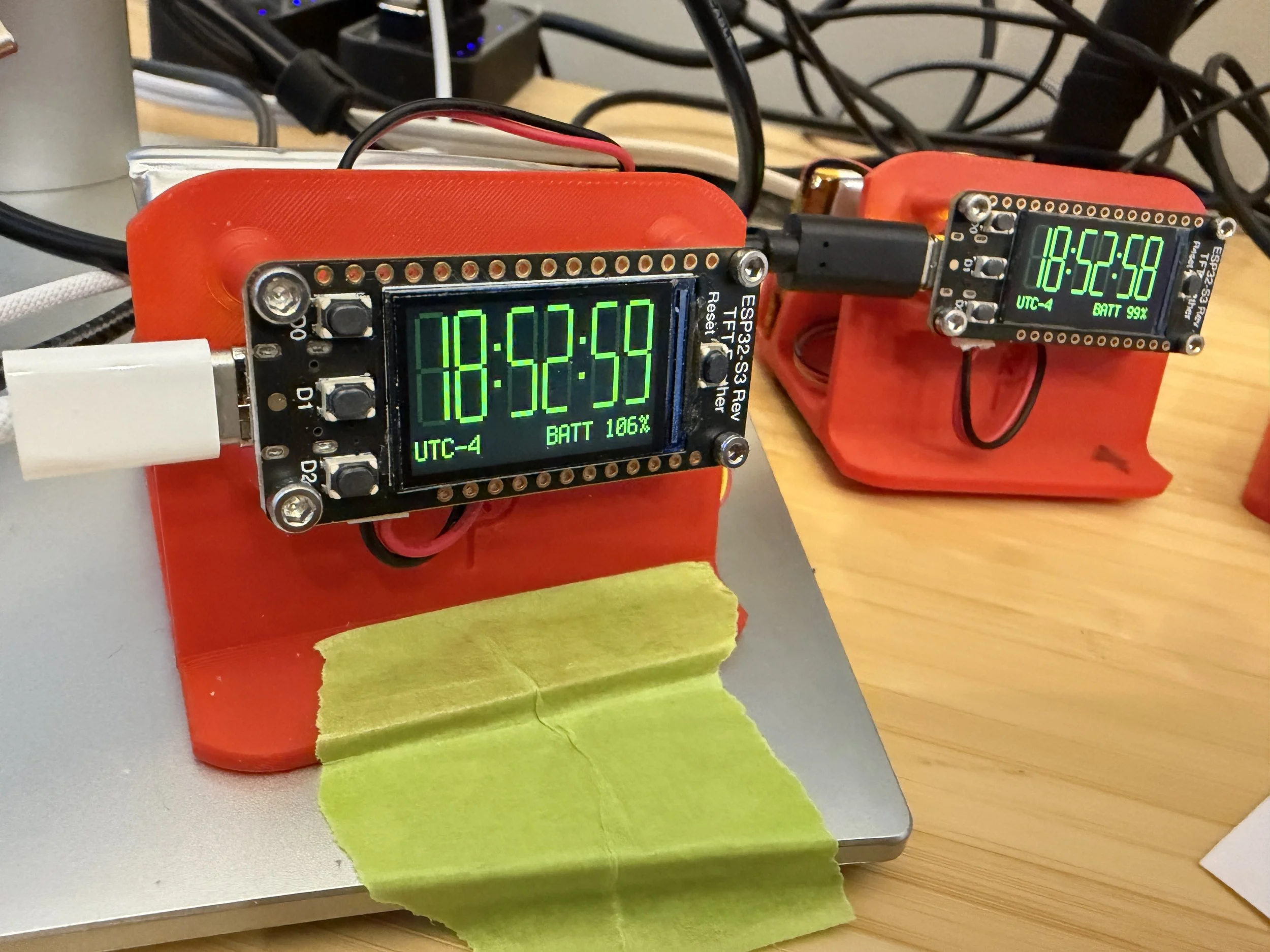
A precision NTP-synchronized clock for the Adafruit ESP32-S3 Reverse TFT
Feather, running CircuitPython.  Time is obtained from the internet via NTP
and displayed as large 7-segment digits on the built-in 240x135 TFT display.


--------------------------------------------------------------------------------
 HARDWARE REQUIREMENT
--------------------------------------------------------------------------------

  Adafruit ESP32-S3 Reverse TFT Feather
  https://www.adafruit.com/product/5691

  Tested on CircuitPython v8 and v10.


--------------------------------------------------------------------------------
 PACKAGE CONTENTS
--------------------------------------------------------------------------------

  code.py
      The main CircuitPython application.  Copy this to the root of the
      CIRCUITPY drive.

  webb_ntp.py
      A custom NTP client module written for sub-second timestamp precision.
      The standard Adafruit NTP library has historically discarded the
      fractional-second component of the NTP timestamp; this module retains
      it for millisecond-level phase alignment of the software clock.
      Copy this to the root of the CIRCUITPY drive alongside code.py.

  lib/
      Required third-party CircuitPython libraries.  Copy the entire lib
      folder to the root of the CIRCUITPY drive.  The following libraries must be present:
        - adafruit_display_text
        - adafruit_max1704x   (battery monitor; for boards with MAX17048)
        - adafruit_lc709203f  (battery monitor; for boards with LC709203F)
      Both battery monitor libraries are optional — the clock auto-detects
      which chip is present.  Boards ship with one or the other depending
      on production date; safe to include both and let the software decide.

  settings.toml
      User configuration file.  Must be edited before first use.
      Copy to the root of the CIRCUITPY drive.  See CONFIGURATION below.


--------------------------------------------------------------------------------
 QUICK START
--------------------------------------------------------------------------------

  1. Copy code.py, webb_ntp.py, the lib/ folder, and settings.toml to the
     root of the CIRCUITPY drive.

  2. Edit settings.toml — at minimum, fill in your WiFi credentials
     (WIFI_SSID and WIFI_PASSWORD).

  3. Power cycle the board.  The display will show a lamp test (all segments
     lit) while connecting to WiFi and performing the first NTP sync.  Once
     synchronized the clock starts ticking.


--------------------------------------------------------------------------------
 CONFIGURATION  (settings.toml)
--------------------------------------------------------------------------------

  WIFI_SSID / WIFI_PASSWORD
      Your WiFi network credentials.  Required.

  NTP_SERVER
      Hostname of the primary NTP server.  Defaults to "time.nist.gov",
      a stratum 1 server operated by the US National Institute of Standards
      and Technology.  Only WiFi credentials are required to run the clock;
      all other settings have sensible defaults.

  NTP_SERVER_FALLBACK
      Hostname of the fallback NTP server, used automatically after
      3 consecutive primary failures.  The clock switches back to the
      primary silently when it recovers.  Default: "pool.ntp.org".

  NTP_SYNC_INTERVAL
      How often to synchronize with the NTP server, in seconds.
      Default: 3600 (one hour).  Shorter intervals improve long-term
      accuracy at the cost of slightly more network activity.

  NTP_SYNC_FUZZ_PCT
      Randomization applied to the sync interval, expressed as a percentage
      of the current interval.  The actual sync time is the current interval
      ± up to this percentage, chosen randomly.  Using a percentage rather
      than a fixed number of seconds means the fuzz scales correctly as the
      adaptive interval grows or shrinks over time.  Prevents multiple
      devices with identical settings from hitting the NTP server
      simultaneously (recommended by RFC 5905).
      Default: 10 (10%).  Set to 0 to disable.

  TIME_FORMAT
      24 for 24-hour display, 12 for 12-hour display.  Default: 24.

  BRIGHTNESS
      Power-on backlight brightness, 0.0 to 1.0.  Default: 1.0 (full).
      Can be adjusted at runtime using the D2 button (see below).

  INFO_BRIGHTNESS
      Brightness of the status bar text (sync countdown and NTP ping),
      expressed as a grey level from 0.0 to 1.0.  Allows the status bar
      to be dimmer than the clock digits.  Default: 1.0.

  DEFAULT_TZ_OFFSET
      Startup timezone as a whole-hour offset from UTC.  Examples: 0 for
      UTC, -5 for UTC-5, 1 for UTC+1.  For fractional-hour zones (e.g.
      UTC+5:30), set the nearest whole hour here and fine-tune at runtime
      with the D1 button.  Default: 0 (UTC).

  BATTERY_INSTALLED
      Set to 0 when running without a battery (e.g. permanent USB or wall
      power).  Suppresses the battery percentage display entirely, since
      the battery monitor chip on the Feather is board-powered and reports
      plausible but meaningless values when no battery is connected.
      Default: 1 (battery present).

  DEBUG
      Set to 1 to enable timestamped verbose output on the serial console.
      Useful when the board is connected to a computer via USB.
      When enabled, the following events are logged with [HH:MM:SS] timestamps
      (or [--:--:--] before the first sync):
        - Boot banner showing version and all configuration parameters
        - WiFi connection with SSID and assigned IP address
        - Each NTP sync produces three lines:
          1) WHAT HAPPENED: local time, RTT, fractional second offset,
             correction in ms (quantized to ~8ms due to ESP32-S3 timer
             resolution; "n/a" on first sync), uptime, free memory,
             and battery percentage + voltage (if present)
          2) WHAT WAS DECIDED: current adaptive interval, direction
             (EXTENDED / SHORTENED / NO CHANGE with before→after on changes,
             or AT CEILING / AT FLOOR when already at the interval bounds),
             and dead band bounds in ms
          3) WHAT IS NEXT: local clock time of next scheduled sync
             and seconds until then
        - Sync failures: error message and next retry time
      Serial console baud rate: 115200.  Default: 0 (disabled).


--------------------------------------------------------------------------------
 DISPLAY LAYOUT
--------------------------------------------------------------------------------

  Clean mode (default on boot):
    Large 7-segment HH:MM:SS digits fill the upper portion of the screen.
    If a battery is detected, the timezone label is left-justified and the
    battery percentage is right-justified in the row below the digits.
    Without a battery, the timezone label fills the full width at larger
    size.  Press D2 to cycle to Date or Status mode.
    Note: the battery monitor chip on the Feather is powered from the board
    regulator rather than the battery connector.  It will report plausible
    values even with no battery physically installed.  The battery display
    is only meaningful when a battery is connected.

  Date mode (D2 short press from Clean):
    The row below the digits shows the current date as "2026-03-30  MON"
    at scale 2, centered.  The date follows the active color scheme and
    rolls over at local midnight automatically.

  Status mode (D2 short press cycle):
    Below the digits, a single line shows the current timezone and the
    result of the last NTP sync attempt:
      "UTC-5  NTP SYNC OK  14:23:05"
      "UTC-5  NTP SYNC FAIL  (OK 14:23:05)"
      "UTC-5  SYNC OFF"  (when in Low Power Mode)
    The bottom status bar shows the time until the next sync on the left,
    the battery level in the centre (if a battery is present), and the
    last NTP round-trip (ping) time on the right.  The battery level is
    updated once per minute.  The sync countdown reflects the live adaptive
    interval, which may differ from the NTP_SYNC_INTERVAL setting.

  Brightness adjust mode (D2 long press):
    All digit segments light up as a full-load brightness reference.
    The zone label area shows the current brightness level as a percentage.
    Short presses cycle through the five available levels.

  Low Power Mode (D1 short press):
    WiFi is disabled and NTP sync is suspended.  The display remains at
    user-selected brightness for 5 seconds, then dims to minimum.
    Any button press in Low Power Mode restores brightness for 5 seconds
    and executes the button's normal function.  The clock continues
    running on the software clock.  The colons change color as an
    indicator.  Press D1 again to return to Normal Mode.

  Error mode:
    If WiFi or NTP fails, the clock digits dim and a bright red error
    message appears overlaid across three lines in the digit area.
    The clock continues running from the last known-good time while
    retrying automatically with exponential backoff.


--------------------------------------------------------------------------------
 BUTTONS
--------------------------------------------------------------------------------

  The three buttons are on the left edge of the board, labeled D0, D1, D2
  from top to bottom.

  D0  (short press)
      Cycles the display color through Green → Red → Blue → Green.

  D0  (hold 0.5s)
      Opens the System Info screen, which remains visible after release.
      Displays: firmware version, NTP server (or SYNC OFF if sync is
      disabled), baseline and current adaptive sync interval with fuzz,
      WiFi SSID, IP address, MAC address, battery level (if present),
      free memory, and uptime.

  D0  (short press while info screen is showing)
      Dismisses the info screen and returns to the clock.

  D1  (short press)
      Toggles Low Power Mode on and off.  When entering Low Power Mode,
      WiFi is disabled and NTP sync is suspended.  The display stays at
      user-selected brightness for 5 seconds, then dims to minimum.
      Any button press in Low Power Mode restores brightness for 5
      seconds and executes its normal function.  The colons change to
      the next color in the color scheme rotation as an indicator.
      Pressing D1 again returns to Normal Mode — brightness restores,
      WiFi reconnects, and an immediate NTP sync is performed (seconds
      digits briefly show dashes while reconnecting).
      Tip: pressing D1 twice (activate Low Power Mode, then return to
      Normal Mode) forces an immediate NTP sync at any time.

  D1  (hold 0.5s)
      Enters timezone edit mode.  The timezone label turns white to
      indicate edit mode is active.  Short presses of D1 then step
      forward through all available timezone offsets, from UTC-12 to
      UTC+14, including all fractional-hour zones (e.g. UTC+5:30,
      UTC+5:45, UTC+9:30).

  D1  (hold 0.5s while in timezone edit)
      Exits timezone edit mode.  The timezone label returns to the
      current color scheme color.  The selected timezone is saved.
      Edit mode also exits automatically after 30 seconds of
      inactivity.  Note: a power cycle reverts to DEFAULT_TZ_OFFSET
      in settings.toml.

  D2  (short press)
      Cycles the bottom row through three modes:
        Clean  — timezone label only (default on boot)
        Date   — current date as "2026-03-30  MON"
        Status — timezone + NTP sync result + status bar
      In Clean mode, the timezone label enlarges; with a battery present,
      the battery percentage is shown alongside it.

  D2  (hold 0.5s)
      Enters brightness adjustment mode.  All digit segments light up as
      a reference.  Short presses of D2 cycle through five brightness
      levels: 5% / 10% / 25% / 50% / 100%.  The sequence is
      roughly logarithmic, so each step feels like an equal change
      to the eye.

  D2  (hold 0.5s while in brightness adjust)
      Exits brightness adjustment and returns to the previous display state.


--------------------------------------------------------------------------------
 ACCURACY NOTES
--------------------------------------------------------------------------------

  This clock uses a software clock driven by time.monotonic_ns() between
  NTP syncs.  The nanosecond integer counter is used deliberately: the
  32-bit float returned by time.monotonic() loses sub-millisecond resolution
  after about one week of uptime, which would silently introduce up to
  ±500ms of display error.  See the technical note at the top of code.py
  for a full explanation.

  The NTP sync applies a half-RTT correction so the displayed time reflects
  true UTC at the moment of the sync, not the moment the server sent its
  response.

  Adaptive sync interval:
  After each successful sync the clock measures the correction — the
  difference between what the software clock believed and what NTP
  reported.  The correction is compared against a dead band centred on
  NTP_ADAPT_THRESHOLD with a width of NTP_ADAPT_BAND percent:

    Below dead band  (correction small)  → extend interval by 20% (AT CEILING if already at max)
    Inside dead band (correction typical) → leave interval unchanged
    Above dead band  (correction large)  → shorten interval by 20% (AT FLOOR if already at min)

  The dead band prevents the system from hunting — without it, a
  correction consistently near the threshold would cause the interval
  to oscillate up and down indefinitely.  With default settings
  (threshold=100ms, band=20%) the dead band spans 80ms to 120ms.
  The interval is bounded between 5 minutes and 3 hours.
  NTP_SYNC_INTERVAL in settings.toml is the starting point; the live
  (adapted) interval is shown on the System Info screen alongside it.
  The fuzz (NTP_SYNC_FUZZ_PCT) is applied as a percentage of the
  current adaptive interval so it remains proportionate at all times.


--------------------------------------------------------------------------------
 BATTERY LIFE
--------------------------------------------------------------------------------

  Battery life varies depending on sync mode, battery capacity, and ambient
  temperature.  Testing was conducted on Adafruit ESP32-S3 Reverse TFT
  Feather units in Normal Mode with the adaptive sync interval at or near
  its 3-hour ceiling.  Low Power Mode (D1 short press) disables WiFi
  entirely and dims the display, extending runtime significantly.

  With a fully charged 2000-2200 mAh battery, expect approximately 22-24
  hours of runtime regardless of whether NTP sync is enabled or disabled.
  This is because the adaptive interval extends the time between WiFi syncs
  to up to 3 hours, making the display backlight the dominant power consumer
  rather than WiFi activity.

  In Low Power Mode the display is dimmed to minimum brightness.  Any
  operation that increases display brightness — such as activating Normal
  Mode or manual brightness adjustment — will reduce battery life
  accordingly.


--------------------------------------------------------------------------------
 USEFUL LINKS
--------------------------------------------------------------------------------

  NTP pool project    : https://www.ntppool.org
  Timezone map        : https://www.timeanddate.com/time/map/
  Adafruit ESP32-S3   : https://www.adafruit.com/product/5691
  CircuitPython       : https://circuitpython.org


--------------------------------------------------------------------------------
 ACKNOWLEDGEMENTS
--------------------------------------------------------------------------------

  Developed in collaboration with Claude Sonnet 4.6, an AI assistant made by
  Anthropic.  Claude contributed code, analysis, debugging, and documentation
  throughout the project, under the direction of Spencer Webb.


--------------------------------------------------------------------------------
 LICENSE
--------------------------------------------------------------------------------

  This software is provided under the MIT License.
  See the license header at the top of code.py and webb_ntp.py for the
  full license text.


================================================================================